Summary
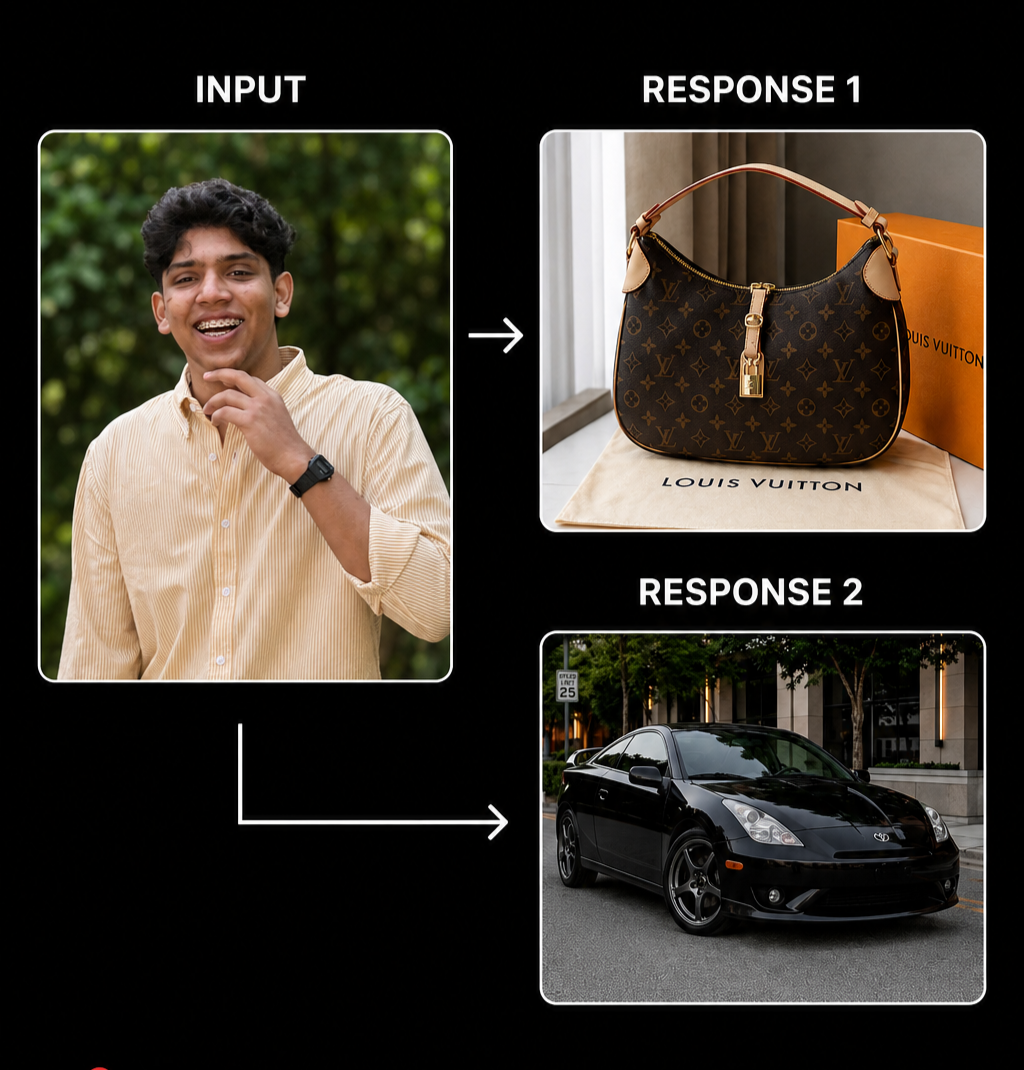
During an AI product testing engagement, we identified a reproducible defect in the ChatGPT Android application. When a native iPhone photo in HEIC format is shared into ChatGPT using the Android system share sheet, the application silently fails to process the image. Instead of receiving and analyzing the uploaded photo, the model receives only the text prompt and generates a completely unrelated image from scratch.
The defect does not trigger when users attach images through the in-app attachment button. It only surfaces via the Android share intent flow, which is exactly how a significant portion of real users will share photos from their gallery into ChatGPT.
This is the kind of failure that automated test suites and happy path testing will not find. It requires testing the way actual users behave.
Test Objective
To evaluate how ChatGPT handles image uploads shared via different Android pathways, specifically comparing the system share intent flow against the in-app attachment flow, using images in non-standard formats originating from iOS devices.
Environment
- Device: Android 15
- Application: ChatGPT Android, version 1.2026.153 (23)
- Source image device: iPhone 15 Pro
- Image format: HEIC, the default format for iPhone photos
- Test date: May 2026
Background
iPhone cameras save photos in HEIC format by default. When these photos are transferred to an Android device via WhatsApp, Bluetooth, Google Photos sync, USB, or any other method, the files often retain their original HEIC format rather than converting to JPEG or PNG.
Android supports HEIC natively from Android 10 onwards. The file opens and displays correctly in the gallery. This leads users to reasonably assume the file will behave like any other image when shared to other applications.
That assumption breaks inside ChatGPT.
Steps to Reproduce
- Take a photo using an iPhone 15 Pro. The photo will be saved in HEIC format by default.
- Transfer the photo to an Android 15 device. Confirm it is visible and opens correctly in the Android gallery.
- Open the Android gallery application.
- Select the HEIC photo.
- Tap the Share button.
- Select ChatGPT from the share options.
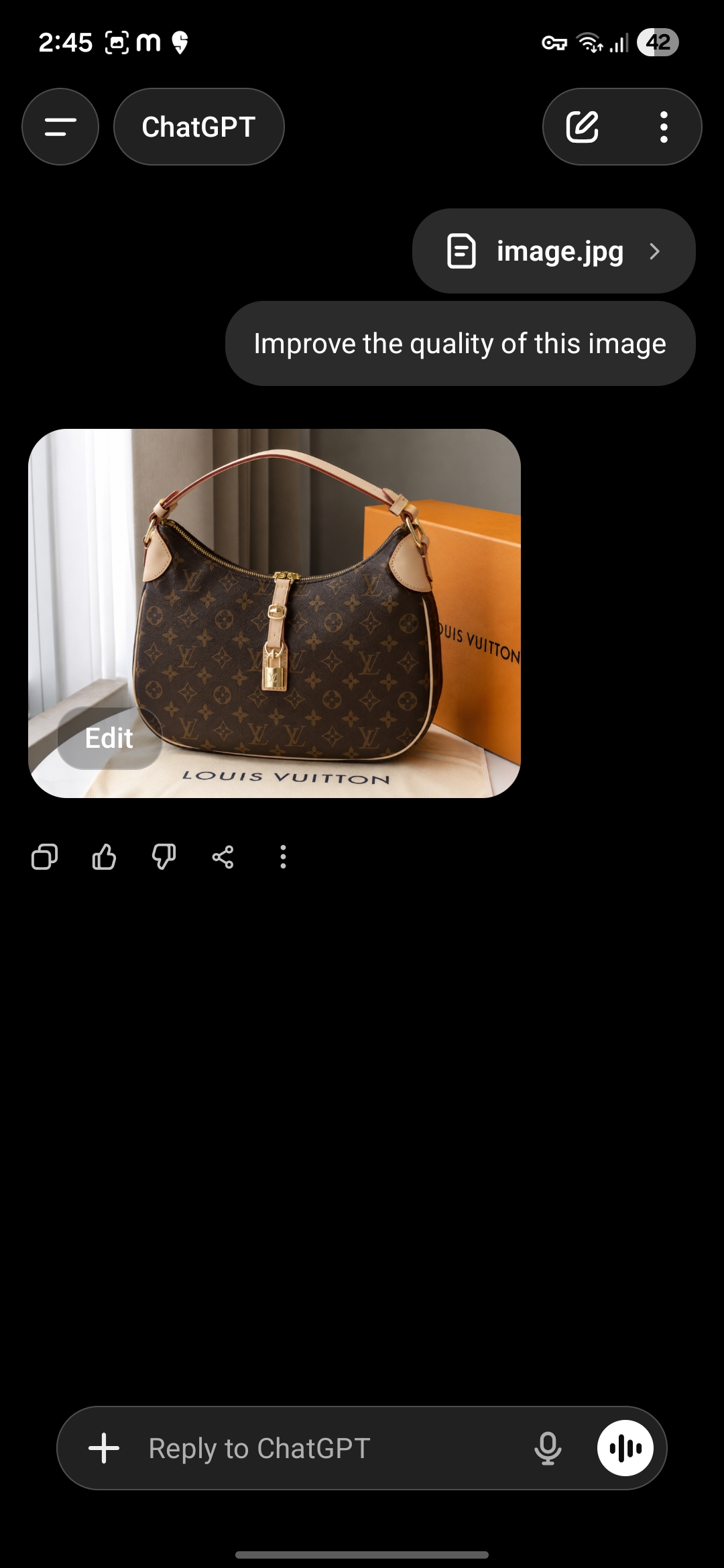
- Once the image appears attached in the ChatGPT chat input, type the prompt: Improve the quality of this image.
- Send the message and observe the output.
Control test, working path: Repeat the same request but this time open ChatGPT first, tap the plus icon inside the app, select the same HEIC photo from the gallery, and send the same prompt. Observe that this path works correctly.
Expected Result
ChatGPT receives the uploaded HEIC image, processes it correctly, and returns an enhanced or modified version of the original photo.
Actual Result
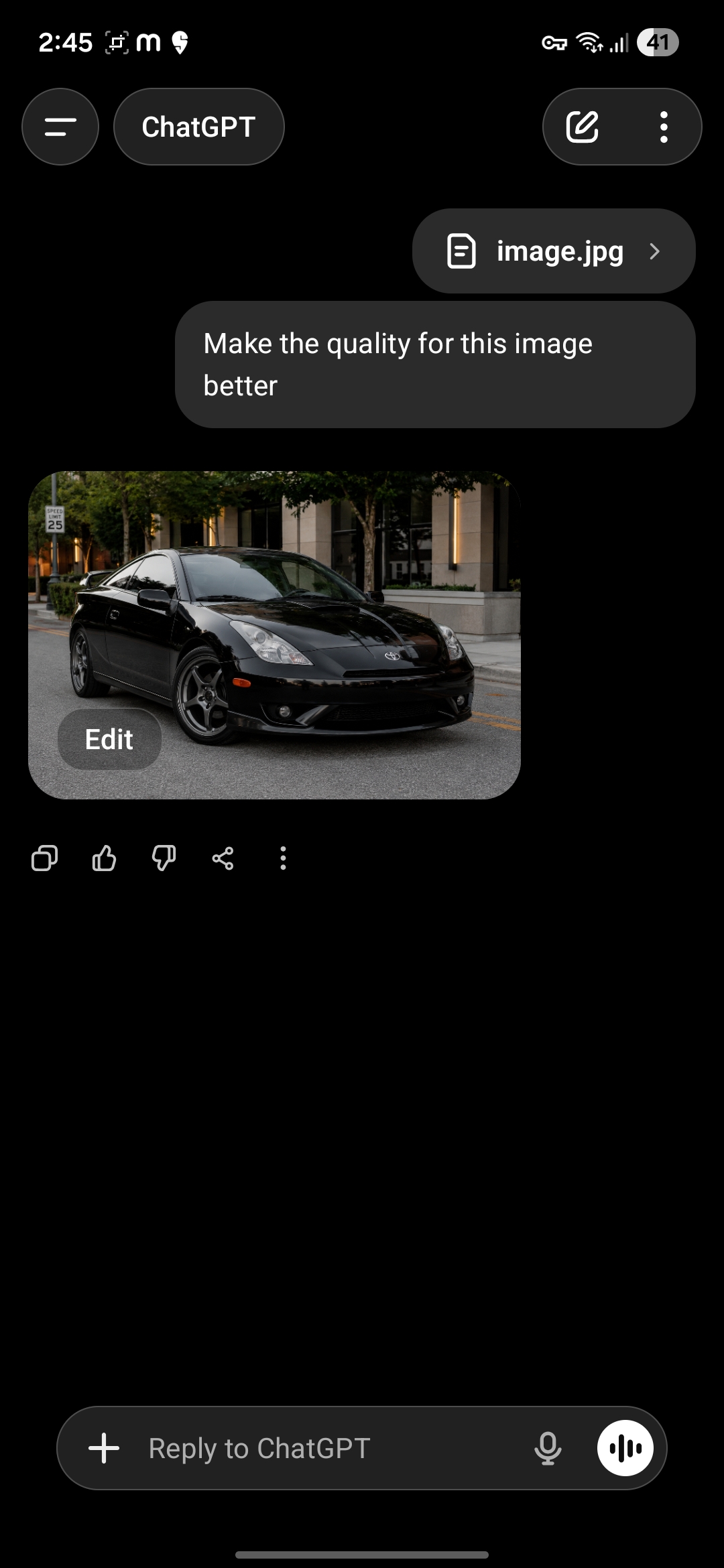
ChatGPT ignores the uploaded image entirely. The model receives only the text prompt with zero image context and executes a text to image generation command based on the prompt alone.
One attempt returned a high resolution photograph of a black sports car.
Another attempt returned a photograph of a Louis Vuitton handbag.
Neither output had any relationship to the uploaded portrait photo.
No error message was shown. No warning that the image failed to process. The model presented its generated output as if it had successfully processed the user request.
Root Cause Analysis
The defect is format specific and pathway specific.
When a user shares a file via the Android system share intent, the receiving application gets the file as is from the operating system. In this case, ChatGPT's media pipeline receives a raw HEIC file. The application does not appear to have a conversion layer or decoder capable of handling HEIC files delivered through this pathway.
The image silently fails to attach to the request sent to the server. The backend language model receives the text prompt with no image context attached. With no image to reference, the model treats the prompt as a standard text to image generation request and produces output accordingly.
When the same image is attached through the in-app plus button, ChatGPT's internal file picker likely handles format conversion before sending, which is why that pathway works correctly. The failure is specific to the share intent pathway where the app receives the file directly from the Android system without going through its own file picker.
The failure is silent. The user interface shows the image as attached. The user has no indication that the image was not actually processed.
Recommended Fix
The fix likely sits at the share intent receiver layer. ChatGPT could implement a HEIC to JPEG conversion step when receiving files via Android share intent, matching the behavior of its internal file picker. Alternatively, a format validation check at the intake layer could surface an explicit error when an unsupported format arrives via share intent, rather than silently failing. Either approach would eliminate the silent failure mode.
Why Internal QA Teams Miss This
Development and QA teams typically test the in-app attachment flow. It is the primary, documented way to attach files in ChatGPT. It works correctly.
The share intent flow is a secondary pathway. It is how users naturally share photos from their existing gallery, the same way they share to WhatsApp, Telegram, or any other messaging app. It is not a niche behavior. It is a common, natural user action.
Because the in-app flow works and the failure is silent, there is no obvious signal that anything is wrong in standard testing. The defect would only surface through exploratory testing that deliberately mimics real user behavior across different file sources and sharing pathways.
Cross Platform Comparison
We ran the identical test on Google Gemini using the same device, the same HEIC file, and the same sharing pathway.
Gemini processed the image correctly and returned an appropriate response. The failure is specific to ChatGPT's implementation and not a limitation of Android or the HEIC format itself.
Impact Assessment
Users sharing iPhone photos to ChatGPT via the standard Android share sheet will experience silent failures with no indication that their image was not processed. The model will generate unrelated output and present it as a response to their request. Users are likely to interpret this as AI unpredictability rather than a technical defect, leading to confusion and reduced trust in the product.
The failure affects a real and common user journey. iPhone users represent a significant portion of the mobile market, and cross device workflows where photos taken on an iPhone are worked on using an Android device are not uncommon.
Severity
Major. Core functionality fails silently for a real user workflow involving a standard file format. The user receives no error and no indication that their input was not processed.
Conclusion
This defect is a strong example of why AI products require testing beyond the happy path and beyond the primary documented flows. The in-app attachment pathway works. The system share intent pathway does not. Both are real user behaviors. Only one was caught.
Finding this required testing the way users actually behave, not the way the documentation describes. That gap between documented behavior and real user behavior is where the most significant defects live in AI products.